You can now automatically hide WhatsApp photos and video from your gallery from people and groups.

When you receive a photo or video from a contact in WhatsApp, after you load it, it’s automatically saved to your phone’s local storage. That means all received content from WhatsApp is visible to anyone who gains access to your default photo gallery. Luckily, there’s a new feature available for the Android version of the app that can prevent this from happening.
Our phones have also become our diaries and for this, it is useful to know how to hide our (private) photos on Whatsapp. Whenever you download an image or video in WhatsApp, it is automatically saved in the file manager and eventually appears in the Gallery.
We share a lot of data via WhatsApp individual and group chat. Sometimes, this data may be confidential and you don’t want anyone else to see it through the Gallery. If you want to have some privacy, you can hide these media files from the gallery or move them to the memory card.
How to hide photos and videos on Whatsapp – Android and iPhone
If you’re like me, and you get countless GIFs, images, and videos on WhatsApp, chances are you don’t like the idea of turning your phone’s gallery app into a meme wasteland. With a new update, WhatsApp has made this incredibly easy to do; just follow the steps below.
Note: Previously downloaded photos and videos will still show up in your phone gallery. This setting only prevents new images from being displayed.
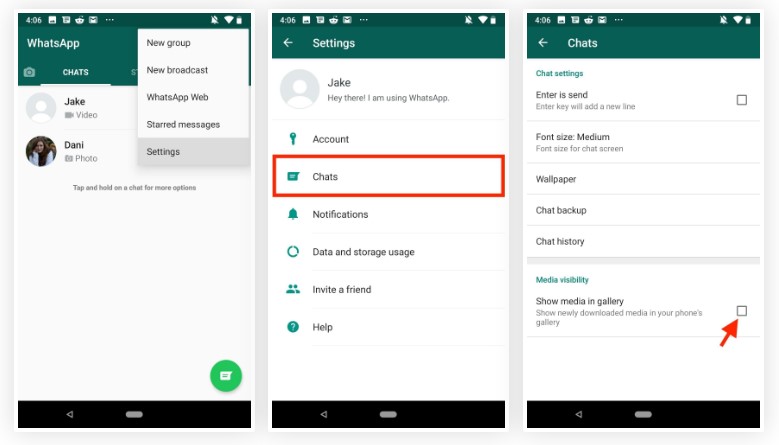
Hide WhatsApp photos and videos on Android
– In the WhatsApp app, tap the three-dot menu icon in the top right, then tap Settings.
– Here, go to “Chat” and uncheck the box next to “Show media files in gallery“.
That’s how, from now on, any WhatsApp photos and videos won’t show up in your phone’s gallery.
Hide WhatsApp photos and videos on iPhone
– In the WhatsApp app on the iPhone, go to Settings, then go to “Chat”.
– Here, turn off the switch next to “Save to Camera Roll“.
Hide WhatsApp photos and videos from people and groups
In case you want to hide a person or group’s WhatsApp photos and videos in your phone’s gallery, you can simply follow the steps below.
Hide WhatsApp images and videos from Android people and groups
– In the WhatsApp app, open the chat or group chat you want to hide photos from. Then, tap the contact name or group.
– Here, tap “Medium Visibility” and choose “No“. Tap “OK” and that’s it.
Hide WhatsApp photos and videos from iPhone people and groups
– In WhatsApp, open the chat or group whose photos you want to hide. Tap the contact name or group.
– Here, tap “Save Camera Roll Media” and choose “No”.
That is, from now on, the photos and videos you receive from that particular contact or group will no longer appear in your gallery or camera roll.
Now that you know how to prevent WhatsApp photos and videos from appearing in your gallery, go ahead and block all media received from your gallery, or just choose specific contacts or groups that spam your gallery with GIFs and memes.